


How to Promote your Hotel on Instagram: The Complete Guide

Contents
How to Build an Instagram Audience for My Hotel?
Creating a Marketing Persona
Using Instagram Audience Insights
Stalking Your Audience
How to Set Up Instagram as a Sales Funnel?
What is a Sales Funnel?
Top of the Funnel: Your Followers
Middle of the Funnel: Your Engaged Followers
Bottom of the Funnel: Your Converting Followers
How to Setup my Hotel Instagram Account?
Personal vs Business Account
Reasons to Switch to a Business Account
How to Switch to a Business Account?
How to Make an Instagram Bio that Converts?
Your Hotel Instagram Bio: Cover the Basics
Your Hotel Instagram Bio: Customise & Convert
How to Promote my Hotel on Instagram with Photos?
Instagram Photos: Cover the Basics
Instagram Photos: Ideas
Instagram Photos: Level Up Your Game!
How to Promote my Hotel on Instagram with Videos?
Instagram Videos: Cover the Basics
Instagram Videos: Level Up Your Game!
How to Promote my Hotel on Instagram with the best Captions?
How to Promote my Hotel on Instagram with #Hashtags?
How Do Hashtags Work?
How to Add Hashtags to My Post?
How to Promote my Hotel on Instagram with Stories?
What's the Difference between Posts and Stories?
How to Post a Story on Instagram?
What to Post on Instagram Stories?
What are Instagram Story Highlights?
How to Promote my Hotel on Instagram with User-Generated Content?
Your Business Profile and Your Location Profile
How Can I Find User-Generated Content?
Among several social media channels, Instagram is the perfect choice for a hospitality business. With a primarily young audience, a range of marketing tools, and a visual medium to showcase your property, it's the perfect place to attract global travellers.
While I've talked earlier about using social media to boost direct sales and revenue, in this article, I'll show you how to promote your hotel on Instagram with quick, actionable tips.
Instagram is one of the most popular ways to promote a travel-related business. Just a single look at some of the numbers gives you a good idea about this social media platform's popularity:
40% of consumers under 30 make a decision about a holiday based on how 'Instagrammable' a destination looks (source: schofields.ltd.uk)
In Asia, 55% of millennials are said to book hotels based on social media, and Instagram is the favoured platform (source: reutersevents.com)
97% of Millennials use social media while travelling, and 75% post to social networks at least once per day (source: forbes.com)
Additionally, some of the world's biggest hotel chains have been actively using Instagram to engage with their audiences and drive direct sales and bookings. For instance, Marriott Hotels has 452,000 followers on Instagram. Similarly, the numbers for Hilton Hotels & Resorts and IHG Hotels & Resorts are 317,000 and 28,900, respectively.
So, would you want to miss a chance to boost direct sales? If not, this article is just the perfect way to get a head start on competitors. Let's see how!
How Can I Use Instagram to Promote My Hotel?
Compared to other social media platforms, Instagram is a visual medium. It focuses on sharing photos and videos with people around the world. Whether you want to engage with short 'stories', captions under posts, videos, stickers, or GIFs, Instagram gives you a plethora of options to experiment and build the perfect marketing strategy.
Like most social media platforms, Instagram isn't just about creating or promoting content. It involves:
Engaging with content posted by guests, staff members, and other profiles
Actively listening to your audience, and understanding what they like'
Understanding how Instagram works and how it's possible to boost visibility
Posting on a regular basis to keep the audience engaged
How Often Should My Hotel Post on Instagram?
While this is one of the most commonly asked questions about promoting a business on Instagram, there's a good reason why it keeps popping up. Simply put, there's no straight answer, and the frequency of your posts will depend on various factors, which we'll discuss later in the post. For now, let's just say that:
Some users post daily
Some users post 2-3 times a week
Some users post weekly
Some users want to stay engaged throughout the day
There's no wrong or right answer here. However, it's worth mentioning that Instagram tends to give more visibility to accounts that post consistently.
So if you have the time and budget to create and promote content daily, it would be ideal. Otherwise, 2-3 times per week can also be a good strategy.
Though it's important to consider the number of posts on your profile, it's even more important to engage with your audience in an engaging, interactive way.

How to Build an Instagram Audience for My Hotel?
Before you can start building an audience for your Instagram profile, and in turn your hotel, it's important to identify the kind of audience you'd want to target. While many hotels try to 'reinvent the wheel' (source: sproutsocial.com), it's not always necessary.
If your marketing team has already created some personas, these can be used to build an audience on Instagram. Simply put, a persona represents the profile of your ideal customer, or a group of customers.
Creating a Marketing Persona
If you don't already have a marketing persona, it's easy to create a few by asking yourself or the team some simple questions (source: trendhero.io):
What specific product do I want to sell or promote?
Who's looking for such a product?
What's the Unique Selling Point (USP) that my business offers?
Who's interested in such USPs?
What kind of people will be interested in seeing my Instagram profile?
Using Instagram Audience Insights
Once you've created a few personas, you can integrate them with Instagram Audience Insights. In order to access 'Audience Insights':
Launch the Instagram app
Click on the Profile Pic in the bottom right corner of the screen
Click on the menu (= three bars) icon on the top left of the screen
From the side menu, click on 'Insights'
This section provides an overview of the people visiting your page and interacting with your posts. The audience is categorised as per age group, gender, location, and other parameters. It's a good way to understand how your content is performing and who's liking the content you're producing.
Stalking Your Audience
Another effective but time-consuming way to learn more about your audience is to go through individual profiles. However, this only works if the person has set the profile to 'public', or if you're already following the individual. In order to view a follower's profile:
Launch the Instagram app
Click on the Profile Pic in the bottom right corner of the screen
Click on the number of followers
Click on any of the followers in the list to check what they've been posting or who they've been following
Alternatively, use the 'Search' button to look for an Instagram profile
How to Set Up Instagram as a Sales Funnel?
Once you've successfully identified the audience on Instagram, it's time to target the personas through your sales funnel. Like other social media channels and Online Travel Agencies, Instagram also has a comprehensive sales funnel.
What is a Sales Funnel?
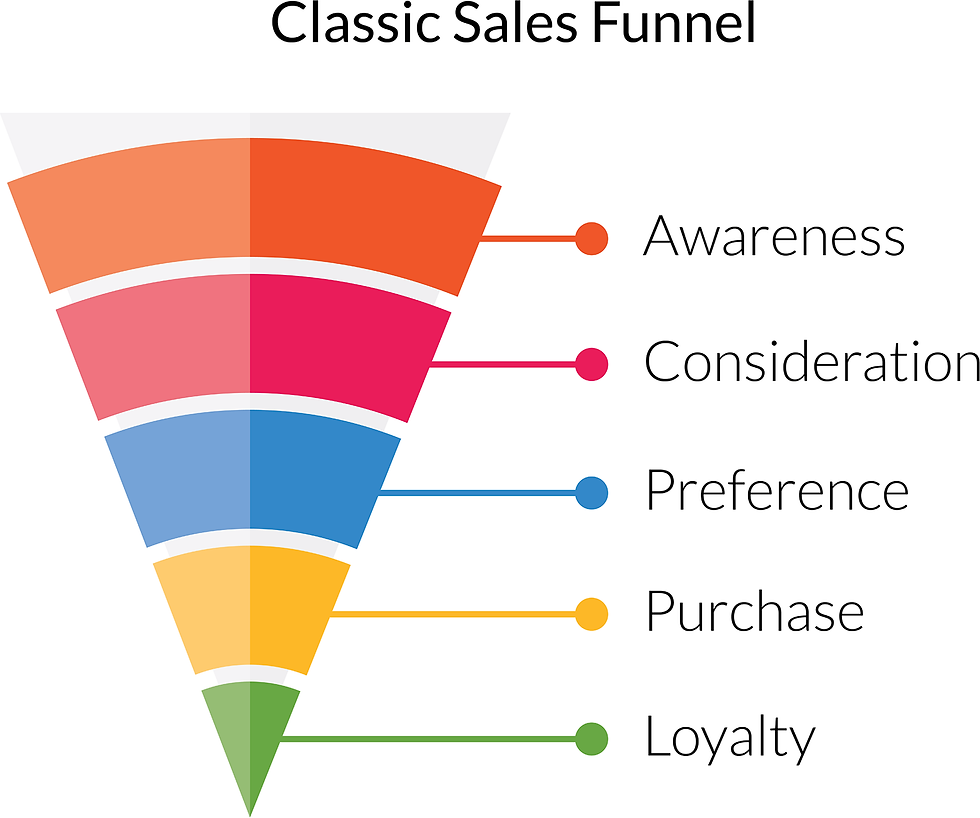
A sales funnel is a well-defined process, clearly divided into stages, phases or steps, allowing visitors to take a desired action, which is most often a purchase.
For the purpose of this article and a better understanding, let us split the sales funnel into top, middle, and bottom, depending on how far the audience is from booking something on your profile.
Top of the Funnel: Your Followers
Your followers are always at the top, or the start, of your funnel. Once you've identified the target audience, it's important to get as many 'qualified' followers as possible, where 'qualified' means belonging to the target audience.
If you try to fill the top of your funnel with random users, it might just improve a vanity metric, such as brand awareness or overall follower count. However, it will not have the desired outcome of increasing direct sales and revenue.
The ratio of followers to sales within the same channel is called the 'conversion rate'. While the generic conversion rate across all industries is 2.6% (source: smartinsights.com ), you might want to shoot higher than that.
Middle of the Funnel: Your Engaged Followers
While having a good number of followers is great, you need to make sure they're engaged with your posts and activity. A low engagement rate is often a symptom of poor content, an uninterested audience, or even the presence of bots.
Engaged followers are one step closer to completing the desired action, which could lead to increased direct sales. They can even provide you with useful insights into your content and let you know what works best for the profile.
Bottom of the Funnel: Your Converting Followers
In most cases, these followers are engaged with whatever you post and often show solid interest in your product or service. These are the ones most likely to convert, which is a good enough reason to constantly engage with them.
How to Setup my Hotel Instagram Account?
While considering these audience categories can help you target the right users, it's important to consider other factors to maximise your marketing reach and potential. It all starts with setting up your Hotel Instagram Account.
Personal vs Business Account
Instagram lets you choose between a basic/personal account and a business profile. If you're a hotel owner or run any other business, you definitely want to create an Instagram business account.
In order to check whether your account is set up as a business profile or not, you can take a look at the bio section. If it doesn't display the contact form or the address, you may be using Instagram Basic.
Reasons to Switch to a Business Account
A business account provides you with more flexibility and a range of features for promoting your hotel on the popular social media platform. Some of the extra features that you get with a business account include :
You can list your Instagram profile under a business category, such as a hotel or travel company. This puts your business among similar audiences and helps you target the right set of personas.
You can add contact details to the profile, including a phone number, business email, and other important information. This helps people reach out to you without much trouble.
You can run paid promotions to advertise a post from your account. This is an easy and effective way to grow your followers.
How to Switch to a Business Account?
If you're using a personal account, it's easy to switch to a business account. Just follow the simple steps below:
1. Launch the Instagram app
2. Click on the Profile Picture in the bottom right corner of the screen
3. Click on the menu (= three bars) icon on the top left corner of the screen
4. Click 'Settings' at the bottom of the sidebar menu
5. Click 'Account'
6. If you're using an Instagram personal account, you'll be able to see an option like 'Switch to business account'. Click this option.
7. You'll be asked to connect the Instagram business account to your Facebook business page. While you can skip this option, it's highly recommended.
How to Make an Instagram Bio that Converts?
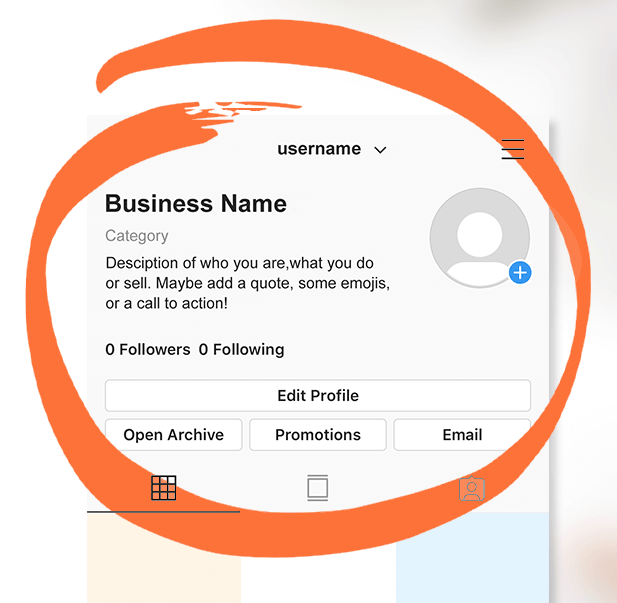
Your Instagram bio is displayed underneath the username. In this section of the profile, you can share interesting details about your hotel in the form of text and emojis. With spaces included, the bio's length can't exceed 150 characters.
Your Hotel Instagram Bio: Cover the Basics
At the very least, your hotel's Instagram bio needs to include the following:
Your hotel's email address
Your contact details
Your hotel's location/address
Your website link
Your Hotel Instagram Bio: Customise & Convert
To make the most of your Instagram bio, focus on aspects that drive higher engagement and conversions. Each word in your bio needs to be interesting and` to-the-point. Here are some simple suggestions:
1. Write your business name, but don't forget about your Unique Selling Point (USP) - While it's important to mention the hotel's name, so people can remember you, it's also crucial to let people know about the property's USP. For instance, your hotel could be 'The highest property in the French Alps' or a 'Celebrity-themed guest house'. Don't forget to miss such details.
2. The next important thing to mention is the reason your audience needs to book a stay. It should focus on how you plan to make their stay memorable. For example, 'We help you get in touch with nature and use only local ingredients in all the dishes'.
3. Last but not least, it's important to flaunt some offers and promotions. For instance, 'Book directly on Instagram for Free Breakfast' can be a good persuasion.
4. Finally, there should be a clear link to the booking page. It's important that the page clearly, easily, and immediately shows the reason or persuasion behind the click. In this case, that would be the 'free breakfast' offer.
Once you've completed the bio, it's time to dive into the right kind of content creation for your Instagram profile. So let's get right onto it.
How to Promote my Hotel on Instagram with Photos?
Since Instagram is a visual medium, photos are at the heart of the platform. In fact, it's the main reason why Instagram was created. It helped users share beautiful photos with friends and family members.
Instagram Photos: Cover the Basics
In order to upload a photo on Instagram, click the 'Library' (iPhone) or 'Gallery' (Android), and select the photo you wish to upload.
Before you click the upload button, it's important to understand the various ratios and sizes. Below, you can find a table showing the Instagram post type, ratio, and size. (source: metricool.com):

Instagram Photos: Ideas
When it comes to Instagram photos, there are certain ideas a hotel can always use. Here are just a few of them (source: travelboommarketing.com):
Local attractions - Is your hotel near a beach, mountainside, or forest? Why don't you show it to the rest of the world?
Rooms - Let people know what the rooms look like
Amenities - Does your hotel have a swimming pool, spa, garden, or games room? People would like to know that!
Food - This is a must. Pictures of delicious food items always do well on Instagram. Click on a few 'specials' only available at your property.
People - While it's good to post photos of the staff, you could use guests' pictures with testimonials in the captions. This helps you build credibility and rapport.
Fun stuff - Don't forget to experiment, have fun, and post about interesting things going on in the travel industry. Use trending news and stories to get some attention.
Instagram Photos: Level Up Your Game!
Once you've covered the basics, it's time to level up your game with a couple of useful tips :
Use a Professional Camera: While a phone's camera is good for quick pictures, it doesn't match the standards of a professional camera.
Use an Editing App. Although the Instagram app provides some basic editing features and filters, they aren't up to the mark. For better results, you should use an editing app.
Though Instagram was born out of the need to share beautiful photos, it wasn't long before videos took the front seat. Let's talk about using videos to promote your hotel.
How to Promote my Hotel on Instagram with Videos?
If you're not using videos as part of your Instagram Hotel Marketing Strategy, you're missing out on a key element. Over the last couple of years, video marketing has become increasingly popular, especially for short-form videos.
Instagram allows you to post videos up to 1 minute long. For videos longer than 1 minute, and up to 60 minutes, you can use Instagram TV (IGTV). In fact, the platform just released a TikTok-style 'Reels' feature that includes video capture, creation, promotion, and editing.
Instagram Videos: Cover the Basics
In order to upload a video on Instagram, click the 'Library' (iPhone) or 'Gallery' (Android), and select the video you wish to upload. Below, you can find the recommended specs for an Instagram video (oberlo.com):
H.264 codec
AAC audio
3500 kbps bitrate
Frame rate of 30 fps (frames per second)/li>
Video can be a maximum of 60 seconds
Maximum video width is 1080 px (pixels) wide
Videos should be 920 pixels tall
Instagram Videos: Level Up Your Game!
While you can use as much creativity as you'd like to create stunning videos for your Instagram profile, there are a few themes and recommendations that often work for building the right hotel marketing strategy:
User-generated Content - This is a must for both photo and video content. By showcasing your guests' videos, you show them appreciation and attention. They will almost certainly appreciate the extra reach your exposure provides. If the video is about a special occasion, like a wedding, just make sure you ask for permission.
Staff - Your team working and/or having fun can go a long way in showing current and potential guests the atmosphere at your hotel. This leads to greater engagement and helps your guests expect better service at the property.
Your location - Once again, if your hotel is by the beach, show it. In fact, flaunt it! The same is true for every other kind of location, including the mountainside, proximity to a monument, distance from the woods, etc.
Now that we've talked about photos and videos, let's turn our attention to another important aspect of Instagram posts: the Caption. If photos and videos are at the heart of Instagram, captions are the soul.
How to Promote my Hotel on Instagram with the best Captions?
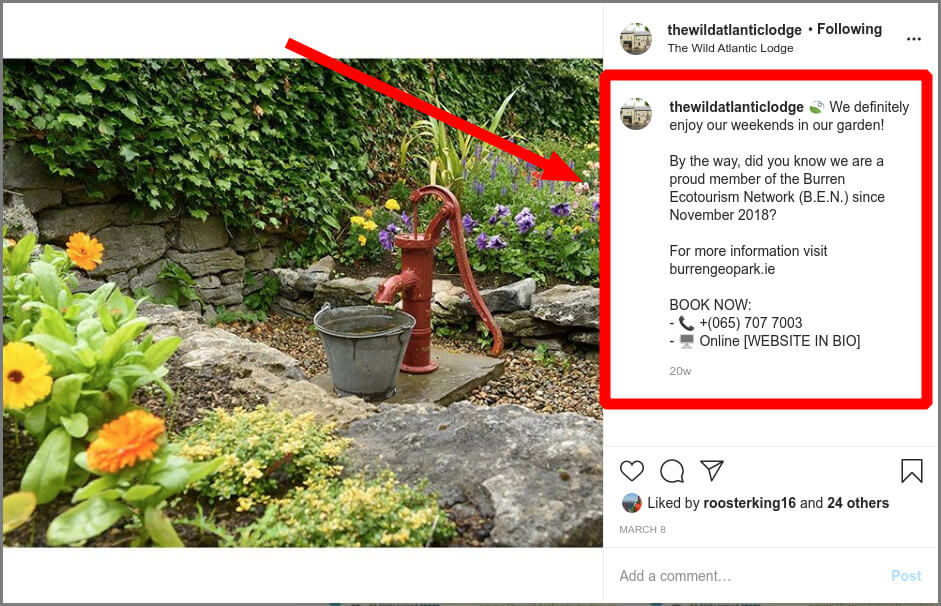
As mentioned earlier, photos and videos are critical elements on Instagram. However, text in the form of captions can further increase engagement, especially if paired contextually with the right visual content (source: e-marketingassociates.com):
Below, I'm giving you some good advice on writing the perfect Instagram captions. I hope these tips come in handy, even if you're not a professional writer or content enthusiast (source: boostly.co.uk):
Stay relevant - Sometimes, you'd want to write a mysterious and cryptic caption, but still make it relevant to the photo or video. With the right hashtags, you could bring some good engagement by creating curiosity among followers.
Conversational tone - It's better to use a conversational tone to make sure your messages get passed across correctly. Simply put, write as you talk!
Be short and concise - Instagram allows up to 2,200 characters in the caption. However, there's no need to use the full limit. Unless it's absolutely necessary, 2-3 paragraphs do the trick.
Consider the 'cut' - The cut separates the part of the text that is immediately visible from the rest of the text, visible by clicking on 'more'. You want to make sure the most important message is above the cut.
Tailor the message for your audience - While writing a caption, you need to tailor the message for your specific audience. Try to use the same lingo, terms, and phrases your audience uses.
Call to action - A caption isn't complete without a call to action. This might be related to booking, sharing info, following the profile, etc.
Hashtags - While you can add hashtags as a comment, they've been known to do better in captions. Whatever you choose, make sure you don't use more than 30 hashtags.
With captions, you can add context to your photos or videos. Moreover, they give you a chance to use hashtags to target the right set of audiences.
How to Promote my Hotel on Instagram with #Hashtags?
On Instagram, hashtags work similarly to keywords on Google. Additionally, Instagram gives you the option to follow hashtags, which have three main functions:
They help organise posts and videos into hashtags
They help users find content easily
They help you expand the reach by tapping into an audience that doesn't follow your profile but follows a specific hashtag
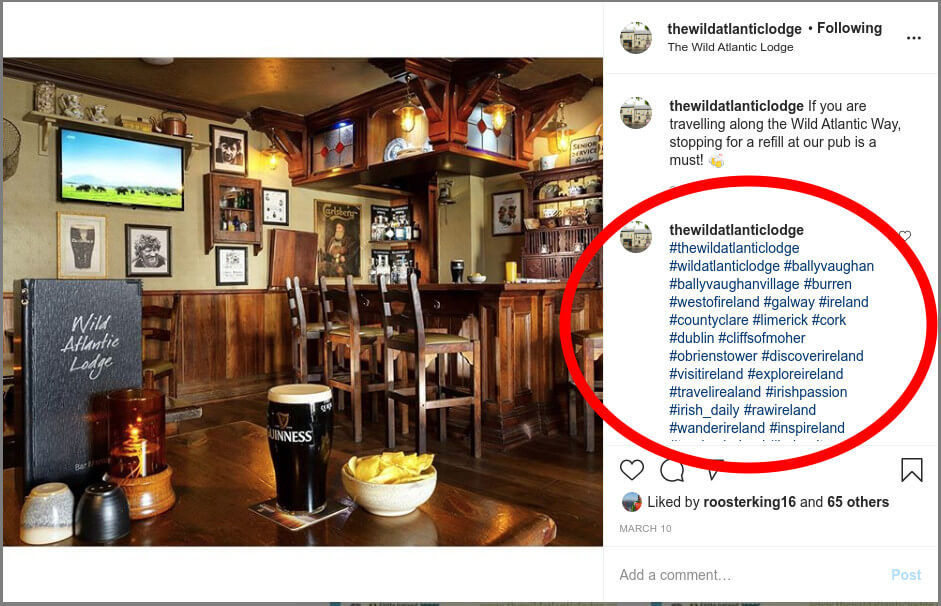
How Do Hashtags Work?
If you click a hashtag on Instagram, it will take you to a page where you can see posts using that hashtag. The posts are split into 'top' and 'recent'. As the names suggest, 'top' posts have the highest visibility and are pushed by Instagram's algorithm due to high engagement, including likes, comments, and saves. On the other hand, 'recent' posts are those that have been used recently with the specific hashtag.
Before you add hashtags to the post, it's important to conduct a bit of research to understand certain parameters. The hashtags you use should be:
Relevant to the post
Relevant to the hotel
Relevant to the audience
Slightly competitive, but not too much
For instance, if you're planning to use the hashtag #traveltheworld, you might want to consider that over 28 million people use it. Hence, it's a highly competitive hashtag, which will make it difficult for you to rank the content among other posts.
Instead, you should choose hashtags that are relevant but not too competitive, especially with a young Instagram profile. It helps you get the right kind of engagement and reach. For instance, #travelUK has been used about 159k times, and it can help you rank the post well.
How to Add Hashtags to My Post?
In order to add hashtags to your Instagram post, simply click the # sign and type a word without spaces. While you type, Instagram's auto-complete feature suggests hashtags you could use. Once again, don't use more than 30 hashtags per post or else the content could be considered spam.
You can use hashtags in the caption or comment (usually the first one). If you choose to use hashtags in the caption, it's better to use symbols like a dot (.) to push them down and separate them from the caption.
With the information I've given till now, you should be able to play around with Instagram bio, photos, videos, captions, and hashtags.
It's time to talk about 'Stories'.
How to Promote my Hotel on Instagram with Stories?
Stories are one of the most engaging aspects of Instagram. These 15-second clips appear at the top of your Instagram feed and help you maintain constant engagement with followers. Every time you post a story, it's displayed as a circle at the top of your followers' Instagram feed.
What's the Difference between Posts and Stories?
While both focus on engagement, Instagram posts appear in the feed and grid. They're always visible in the grid unless you decide to archive or delete them. On the other hand, Stories are visible at the top of your and your followers' Instagram feeds for up to 24 hours.
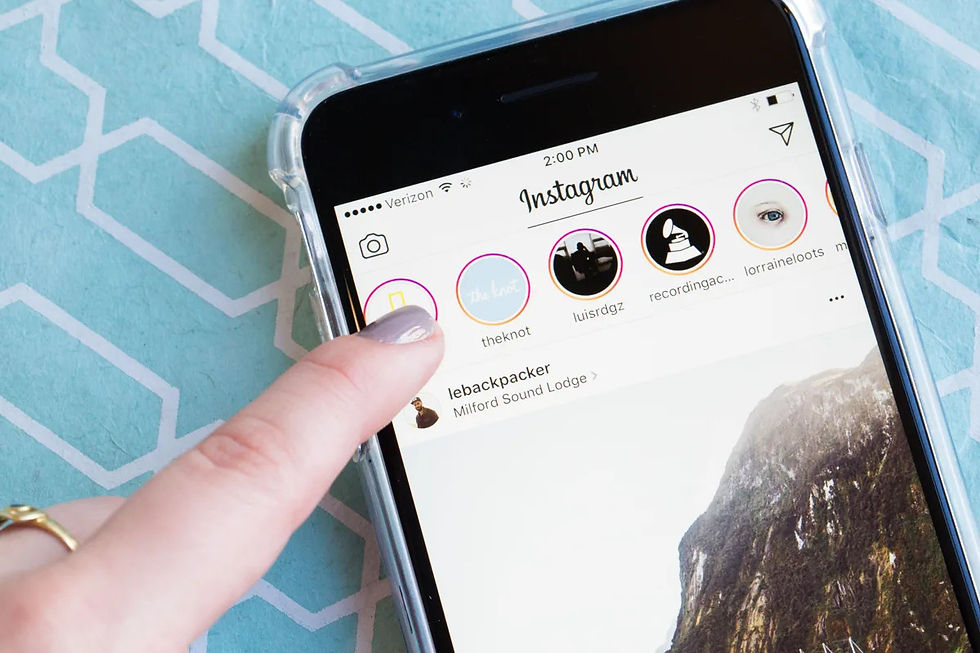
In case you want the Story to be visible for more than 24 hours, you can create a 'Story Highlight' and add the Story to this section.
Unlike posts, Stories can't be 'liked' by users, and don't have a 'comments' section. However, they let you create polls and share opinions, while your followers can reach out via DMs (direct messages) and emojis.
How to Post a Story on Instagram?
If you don't already have any live Stories, it's the right time to leverage this amazing feature. Simply launch the Instagram app and click 'Your Story' in the top-left corner of the screen. You can even share other people's posts in your 'Story' if they're public.
In case there is one or more Stories currently visible in your profile, press and hold the 'Your Story' icon on the top left corner of the home screen until you see a pop-up saying 'Add to your story'. Then, just click on it.
What to Post on Instagram Stories?
When it comes to 'Stories' on Instagram, you can get quite creative with the content. However, certain aspects of the content work well for hotel businesses. These include:
Behind the scenes - Conventionally, stories have been used to show some 'behind the scenes' content, mostly in the form of videos. For example, it could be your chef preparing the evening menu.
The Menu - If your hotel has a restaurant, especially if your menu changes often or uses local ingredients, stories could be a good vehicle for promoting your dishes.
Special offers and discounts - Stories are a great way to inform your followers about special discounts and offers, especially if limited in time.
Reviews - If you've received a nice review, there is nothing wrong with pushing it out there through a 'Story'. Just remember to keep the balance and avoid over-promoting your hotel.
What are Instagram Story Highlights?
Simply put, Story Highlights are featured stories that you want your audience to see when they visit your Instagram profile. These are displayed as circles at the top of your profile, right between your contact options and your posts. Story Highlights are always visible to your audience until you remove them from the profile.
Just like Stories, you can get creative with Story Highlights. However, there's some content that you need to focus on to get better results. Long-term promotions, awards, achievements, property images, etc., are all good choices.
So now that we've talked about the content you can create and post, what else? Well, it's time to understand the importance of user-generated content. User-generated content can do wonders for getting engagement and increasing your reach.
How to Promote my Hotel on Instagram with User-Generated Content?
Generating content takes a lot of time and effort, especially when done regularly. Hence, why not leverage and re-post the content that your guests or staff post on Instagram? This allows you to achieve dual goals:
1. You'll be able to leverage some ready-to-use content for your Instagram profile.
2. You'll be able to acknowledge and show appreciation to your guests and staff.
Your Business Profile and Your Location Profile
Places like hotels, restaurants, cafes, etc. have two types of profiles on Instagram:
1. A business (or personal) profile
2. A location profile
Your location profile is automatically generated by Instagram (you don't need to do anything).
When someone takes a picture or video and sets your hotel as the location, the content will appear under your 'location profile' and be visible to anyone visiting that location. By default, the 'location profile' is public and cannot be changed.
How Can I Find User-Generated Content?
Instagram users have several ways of interacting with a hotel (or a place in general):
They can tag the hotel's profile in a post. When somebody types '@' followed by your Instagram handle (with no spaces) in the caption of a post, they are tagging you. This means you will receive a notification about the tag, and the post will show on your profile under 'tags'.
They can tag the hotel's profile in a story - When somebody types '@' followed by your Instagram handle (with no spaces) in the text of a story (or by using the 'Mention' sticker), they are tagging you. This means you will receive a notification and be able to add it to your story.
They can select the hotel as a location in a post. When somebody selects your hotel as a location for their post, you will not be notified. In this instance, the post will be listed under your 'location profile'.
They can select the hotel as a location in a story. When somebody selects your hotel as a location for their story, you will not be notified. In this instance, the story will be visible for 24 hours on your 'location profile'.
They can use a hashtag with the hotel's name. When someone uses your hotel's name as a hashtag, you will not be notified.
To make sure you don't miss the content generated by these users, regularly check your hashtag (and its variations) for new content, and encourage your followers to do the same.
How Do I Repost Content on Instagram?
There are a number of apps that let you repost content from other Instagram profiles. Here, I am listing (arguably) the top five apps (source: vkonnect.com):
Repost for Instagram
Regram Posts
InstaRepost
Regrann
Reposter for Instagram
These apps allow you to repost content directly from Instagram and tag the original author.
Tagging the content creator is considered the best practice. In some cases, you might also want to ask for permission to repost the content (especially if it's about private events like a wedding).


Comments